WorkingSLOT 01New build
Phoenix ROB RUN Internal
Memory and Silent Aim, faction, loot and camera ESP, radar and Skin Changer.
 GAME CAPTURE / AEGIS
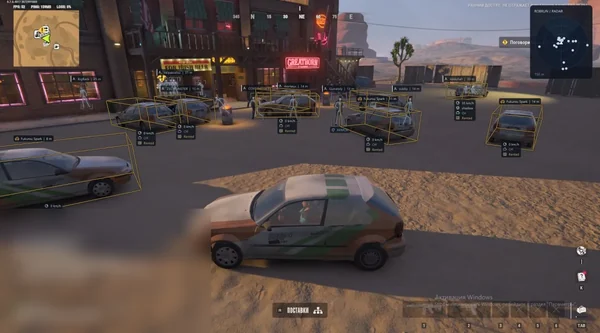
Aegis displays players, NPCs, loot and city objects, while its aimbot accounts for target movement. Russian and English menu, USB-only launch.
Duration: 1 day. Check it again on the DigiSeller page before paying. Your key and guide will be in the order and by email.
Descriptions and functions are based on current build data. Check the guide in your order before launching, as requirements may change after patches.
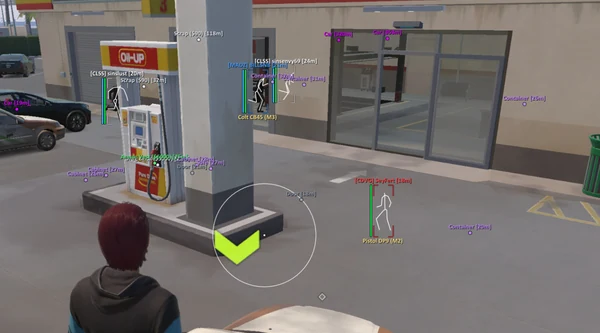
Aegis is useful when you need more than an opponent's position before a fight. It distinguishes roles, health, armour and weapons, giving bandits, police and civilians different colours. NPCs remain separate from live players, while arrows and the 2D radar reveal contacts outside your immediate view.
Aim Assist provides bone selection, target priority, FOV, smoothing and range. Prediction calculates a lead point, and Humanization adjusts the tracking path. Loot tools filter by price and rarity while marking cash, cargo, safes and vehicle trunks. Battle Mode removes unnecessary labels with one hotkey when a fight begins.
Disable Windows Defender, antivirus and Memory Integrity before downloading the loader.
Move the loader to a USB flash drive and delete every PC copy, including the Recycle Bin.
Run it from USB as administrator, enter your key and wait for a successful start.
Open ROB RUN through Steam, wait for the server to load and press INSERT.
Select Russian or English in Misc and save your config.
All listed settings by section. Open the block you need.
Enable ESP activates player visuals; its hotkey and bind mode are configured separately.
Bandits, police and civilians have independent switches and custom colours.
Bounding Box supports a hotkey and full or corner 2D box styles.
Skeleton offers a hotkey, custom colour, thickness, head circle and distance fade.
Lines can start from the bottom of the screen, the crosshair centre or the top edge.
Max ESP Distance limits player markers to a range between 25 and 1000 metres.
Player Names displays nicknames, while Show Entity ID adds the entity number.
Show Distance adds the range to each character in metres.
Health Bar and Armor Bar display current HP and armour.
Held Weapon / Item displays the weapon or item currently held by the character.
Knocked State uses a separate colour, and Hide Knocked Players removes their markers.
Enable NPC / Bot ESP provides a separate display for bots and non-player characters.
NPC Max Distance sets the display range from 20 to 1000 metres.
Boxes, skeletons, names, held weapons, state tags and distance are available for NPCs.
Arrows indicate direction with adjustable radius, size and maximum distance.
Enable 2D Radar displays a mini-map with configurable size and range.
Ground Loot Master controls ground items as a group and assigns their colour.
Weapons, ammo and magazines, armour and tactical gear, valuables and tools have separate switches.
Cash Bundles and Cargo Packages display money and cargo with custom colours.
Player Bags & Car Trunks marks player bags and vehicle storage.
Min Price Filter hides cheap items using a threshold from 0 to 50,000 in-game dollars.
Weapon Crates & Cases highlights weapon containers with a separate colour.
Safes & Containers displays storage, while Show Unopened Safes isolates unopened safes.
Max World ESP Distance limits object markers between 25 and 1000 metres.
Common, Uncommon, Epic, Legendary and Exotic tiers toggle independently.
Vehicles / Cars highlights vehicles with a custom colour.
Doors & Buyers marks entrances and traders with independent colours.
Normal, alarm and destroyed states have separate colours; camera range is 15 to 1000 metres.
Hide Destroyed Cameras removes cameras that are already out of action.
A hotkey hides loot and clutter, while the optional HUD banner shows that the mode is active.
The aimbot supports hold, toggle, always-on and Off Hotkey modes.
Choose Head, Neck, Chest, Pelvis or Nearest to Crosshair.
Select the target closest to the crosshair within FOV or closest by distance.
Aim FOV Radius sets the acquisition area from 1 to 180 degrees.
Aim Smoothness adjusts crosshair tracking from 0 to 30.
Max Aim Distance limits target selection between 10 and 1000 metres.
Draw FOV Circle shows the acquisition area, and Draw Target Line marks the selected target.
Movement Prediction accounts for target motion, with an optional prediction cross.
Trajectory and Strength settings adjust the aiming path and effect intensity.
Ignore Friends & Party excludes teammates and provides a custom team colour.
Ignore knocked players and vehicle occupants; select bandits, police and civilians separately.
Fast Loot speeds up looting, while Debug Camera enables the debug camera.
Add or remove players from the current-match friends list, or clear it entirely.
Menu Toggle Hotkey assigns the menu bind; INSERT is the default.
Accent colour, watermark HUD, menu scale from 75 to 150 percent and ESP font selection.
Hide ESP When Unfocused removes markers when the game window loses focus.
The developer states that the menu and ESP stay out of OBS and screen capture; test with a short recording.
Menu & ESP Language switches the interface and markers between Russian and English.
VSync and FPS limits include monitor refresh rate, 60, 100, 144, 180, 240, 360 or unlimited.
Unload Software disables the cheat without searching for its process.
Create, load, save, duplicate and delete complete settings profiles.
Real build captures. Select one to inspect the interface.
Added Aegis with prediction aim, player and NPC ESP, loot price and rarity, cameras, a 2D radar, Battle Mode and a Russian menu.
UpdatesROB RUN uses Easy Anti-Cheat. Working status does not guarantee immunity from bans. Check requirements and avoid conspicuous settings on an account you cannot risk losing.
Features, launch and compatibility.
Aegis lists Aim Assist with prediction and humanization, but no Silent Aim. It has its own menu, loot price and rarity filters, a 2D radar and Battle Mode.
No. The loader must remain on and run from a USB flash drive. Delete PC copies to avoid a possible Bad HWID error.
Versions 26H1 and 26H2 are not supported. Other listed Windows 10 / 11 builds are included; a 64-bit system and Steam client are required.
Yes. Set a minimum price up to 50,000 in-game dollars and select rarity tiers from Common through Exotic.
Yes. Russian and English menu and ESP languages are selected in Misc.
According to the developer, it hides the menu and ESP from OBS and screen capture. Test it with a short recording before streaming.
Thirty days cost 3499 RUB. One day is 399 RUB, three days 899 RUB and seven days 1899 RUB.
Memory and Silent Aim, faction, loot and camera ESP, radar and Skin Changer.
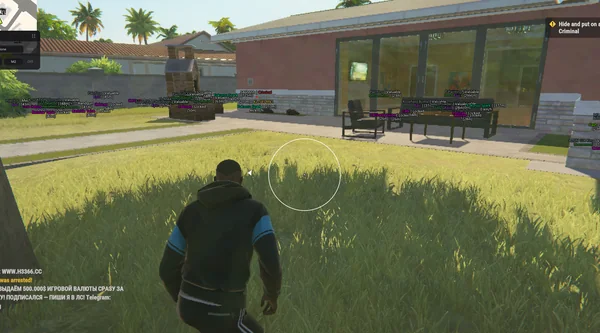
Aimbot and Silent Aim, plus player, cash, loot and vehicle ESP.
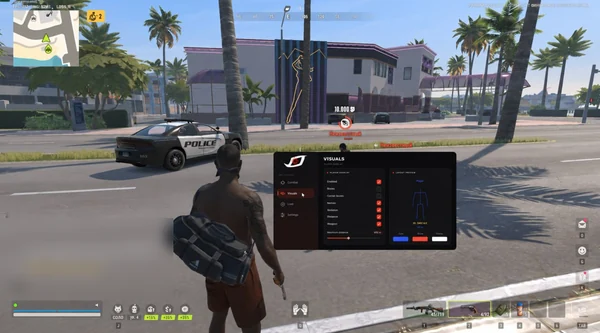
Bone-selectable aim, role colours, dropped loot and cargo in one compact menu.