WorkingSLOT 01New build
Phoenix ROB RUN Internal
Memory and Silent Aim, faction, loot and camera ESP, radar and Skin Changer.
 GAME CAPTURE / DULLWAVE
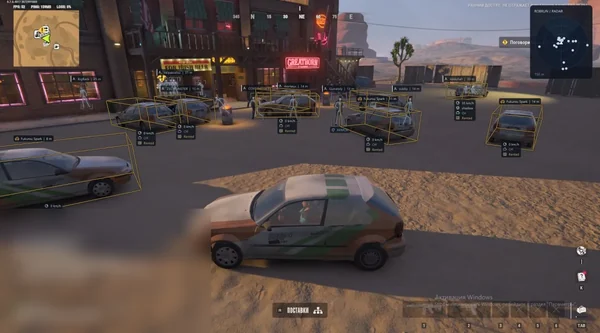
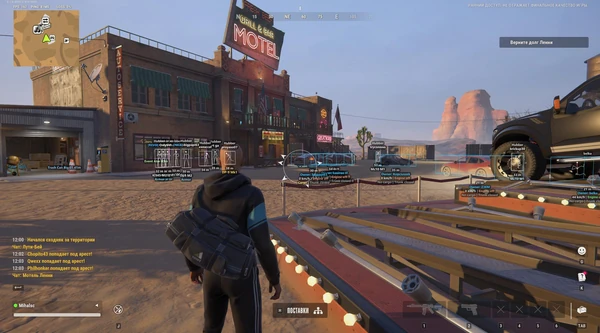
Dullwave distinguishes police, robbers and civilians, displays vehicles with cargo and engine state, and changes character appearance.
Duration: 1 day. Check it again on the DigiSeller page before paying. Your key and guide will be in the order and by email.
Descriptions and functions are based on current build data. Check the guide in your order before launching, as requirements may change after patches.
Dullwave separates settings by role: police, robbers and civilians have independent aim and ESP filters. Prediction tracks moving targets, Ignore Knocked removes downed characters from acquisition, while Nearest and Torso Only control the aim point. FOV, both smoothing axes and target distance are configurable.
Cars and helicopters display owner, speed, engine, cargo and trunk information. Containers, bags, hidden places, cameras, doors, bases and NPCs toggle by category. The skin changer has six sections, while radar, player list, Instant Loot Reveal and Battle Mode are grouped in Misc.
Check your Windows build with winver and disable Secure Boot, Windows Defender and SmartScreen under Dullwave's instructions.
Download the loader from your order materials and run it as administrator. No flash drive is needed.
Enter the key from your order, wait for activation and launch ROB RUN in your preferred display mode.
Enable the required roles and functions, then configure colours, distances and the aim bind. The menu key is provided in the key guide.
If the loader reports an error, save its text and contact support instead of replacing files from third-party sources.
All listed settings by section. Open the block you need.
Aim is toggled separately. The official screenshot shows Right Mouse assigned, and the bind can be changed.
Excluded knocked characters so targeting does not jump to someone already down.
Prediction accounts for target movement and applies a lead while tracking.
A dedicated filter allows or prevents targeting characters with the Civilians role.
Robbers can be included in targeting independently of other characters.
Cops have their own switch, keeping police targeting under separate control.
Nearest selects the closest available point, while an additional option restricts selection to the torso.
A line to the selected target shows where the current aim lock is directed.
A slider adjusts the aiming radius, and Draw FOV displays that area on screen.
Horizontal and vertical smoothing are configured independently.
A separate parameter limits the distance at which the aimbot selects characters.
Police, robbers and civilians have independent sections with switches and colours.
A separate coloured marker indicates where a character died.
An arrow points towards a character outside the central view.
A box marks the character outline, with a configurable colour for each role.
A label shows the character's weapon, as demonstrated on Dullwave's official gameplay capture.
Dead characters appear as a separate overlay element.
The player's nickname appears beside the character.
The skeleton conveys body position and posture through obstacles.
The clan prefix accompanies the nickname and helps identify members of one group.
A numeric label reports the distance to the character.
A line connects your viewpoint to the marked character.
The overlay displays armour and the character's current role.
Each role has its own render-distance slider to reduce unwanted distant markers.
Cars enables boxes and information about nearby automobiles.
Helicopters displays air vehicles as a separate object class.
Show Owner labels the vehicle owner when this information is available.
Show Speed reports the current speed of a car or helicopter.
Show Engine reports the engine state, including a switched-off parked vehicle.
Show Cargo displays information about carried goods.
Show Trunk indicates the trunk state, such as open or closed.
Containers marks loot containers and assigns them a separate colour.
Loot bags appear separately from other items.
The main toggle displays loot within the configured radius around your character.
The Render Distance slider limits how far item markers appear.
Surveillance cameras receive their own marker and colour.
Hidden locations are highlighted as a dedicated object category.
Doors marks nearby doors without mixing them with containers and loot.
Bases displays bases around your route.
Non-player characters appear separately from police, robbers and civilians.
A second slider limits the render radius for cameras, doors, bases, NPCs and hidden places.
A drop-down list selects the character body's visual variant.
The backpack can receive a different visual variant from its own list.
The mask changes independently of other equipment.
The keychain has its own list of available variants.
The hairstyle is selected separately, with a no-hair option visible in the official settings.
The Head section changes head appearance through another drop-down list.
Reveals loot information immediately instead of waiting for the usual contents delay.
The player list gathers characters in a separate interface element.
The built-in radar displays surroundings in a separate view and is enabled from Misc.
Battle Mode has a dedicated switch and its own settings.
ESP Text Background places a backing plate behind labels for readability on complex scenes.
Overlap fading reduces clutter where multiple overlay elements intersect.
Menu Text Size and ESP Text Size independently adjust menu and in-game label sizes.
Real build captures. Select one to inspect the interface.
Added Dullwave with role-based aim, character and vehicle ESP, loot and hidden places, skin changer, radar and Instant Loot Reveal.
UpdatesROB RUN uses Easy Anti-Cheat. Working status does not guarantee immunity from bans. Check requirements and avoid conspicuous settings on an account you cannot risk losing.
Features, launch and compatibility.
Independent Cops, Robbers and Civilians settings, detailed vehicle cargo and engine data, six skin-changer sections and Instant Loot Reveal.
Yes, use Ignore Knocked. Target roles also toggle independently, and Nearest can be restricted to the torso.
Yes, Show Cargo and Show Trunk are in Vehicle alongside owner, speed and engine state when available.
Body, Bag, Mask, Keychain, Hair and Head. All six sections are included in every plan.
No, the loader runs from your drive. Dullwave's general instructions require Secure Boot to be disabled in BIOS/UEFI.
No, a spoofer is not included and is not required for activation. It remains a separate optional extra.
Thirty days cost 2190 RUB before any payment service fee. One day is 290 RUB, three days 580 RUB and seven days 1190 RUB.
Memory and Silent Aim, faction, loot and camera ESP, radar and Skin Changer.
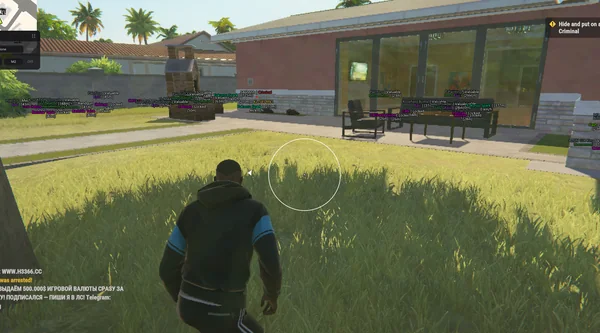
Aimbot and Silent Aim, plus player, cash, loot and vehicle ESP.
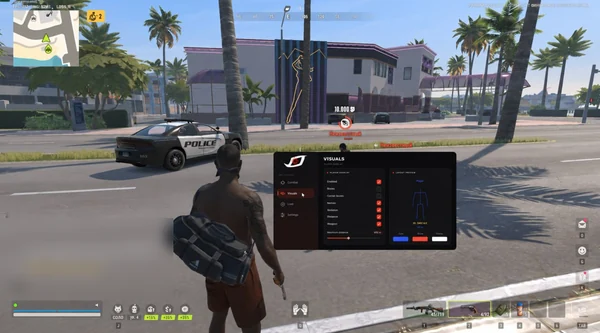
Bone-selectable aim, role colours, dropped loot and cargo in one compact menu.